While large enterprises race to adopt AI, the tools that deliver real value remain expensive, complex, and locked behind cloud-only subscriptions or enterprise sales cycles. Most families, schools, public libraries, and community organizations are left choosing between fragmented consumer apps, privacy-invasive services, or tools that require significant technical expertise to set up and maintain.
Hearth (also known as CasaHub) is built to close that gap. It is a complete, pre-configured AI workspace that brings powerful document tools, AI chat, and coding assistance to ordinary users — whether they run it on a Mini PC or Raspberry Pi at home, host it on an inexpensive VPS, or keep their files in familiar cloud storage such as Google Drive, Dropbox, or OneDrive.
Why Everyday Users Need a Different Kind of AI Platform
Most AI products today are designed either for individual consumers (chatbots and simple generators) or for large engineering teams (gateways, governance platforms, and developer toolchains). The middle ground — practical, private, and affordable AI that helps people get real work done — is underserved.
Today’s major LLM providers mainly offer web-based services. While these interfaces are powerful, they create several practical problems for regular users:
Too broad and unfocused — The tools try to be everything to everyone. Frequently used everyday features (writing letters and résumés, converting documents, preparing presentations, helping with homework, or learning to code) are not brought together in one coherent place. Users must hunt across chats, separate apps, and external tools.
Not intuitive for real work — The chat-centric interface works well for quick questions, but it is not designed as a productivity workspace. Creating, editing, organizing, and revisiting real documents or projects feels indirect and fragmented.
Files and work are locked inside the provider’s system — Personal documents, conversation history, custom assistants, and project context live inside each provider’s walled garden. Exporting them cleanly, moving to another provider, or keeping a durable local copy is often difficult or incomplete. Switching providers can mean starting over.
Additional related frustrations include:
- Privacy concerns when family documents, student work, or community records are uploaded to third-party servers.
- Dependency on continuous internet access and the risk that an outage, rate limit, or pricing change suddenly breaks daily workflows.
- The need to juggle multiple subscriptions and accounts just to cover writing, conversion, presentation, and light coding tasks.
- Lack of offline or local-first options for users who value control or face unreliable connectivity.
Households, teachers, librarians, students, and small community groups therefore face a consistent set of pain points:
- Writing a polished letter, résumé, school report, or presentation still means juggling multiple websites and subscriptions.
- Coding help or learning resources often require accounts, usage limits, or constant internet access.
- Cloud-only tools raise privacy concerns when family documents, student work, or community records are involved.
- Setting up and maintaining local AI tools is still too technical for most people.
- When a major provider has an outage or changes pricing, everyday workflows break.
- Personal work product becomes hard to port or fully own once it lives inside a single provider’s ecosystem.
Hearth addresses these problems by packaging a full AI-assisted productivity environment into a single, self-contained platform that can run locally or be lightly hosted — keeping the user’s files under their control and making the most-used tools available in one place.
What Hearth Provides Out of the Box
Hearth arrives pre-configured with the tools people actually need day to day:
AI-assisted document generators, converters, viewers, and editors
Create letters, résumés, reports, presentations, lesson plans, and more. Convert between common formats. View and edit documents without leaving the workspace.Integrated AI chat
A reliable conversational assistant that can help draft text, answer questions, explain concepts, and support learning — available even when running fully locally.AI coding assistants
Browser-based coding environments and AI coding agents that make it practical for students, hobbyists, and adults learning to code to get real help without complex local setup.Integration with popular cloud storage
Connect directly to Google Drive, Dropbox, OneDrive, and similar services so users can keep working with the files they already have, without uploading them into a closed AI platform.
Because these capabilities ship together and are designed to work with local or lightly managed deployments, users spend their time producing work rather than configuring software or fighting vendor lock-in.
The Web Workspace at a Glance
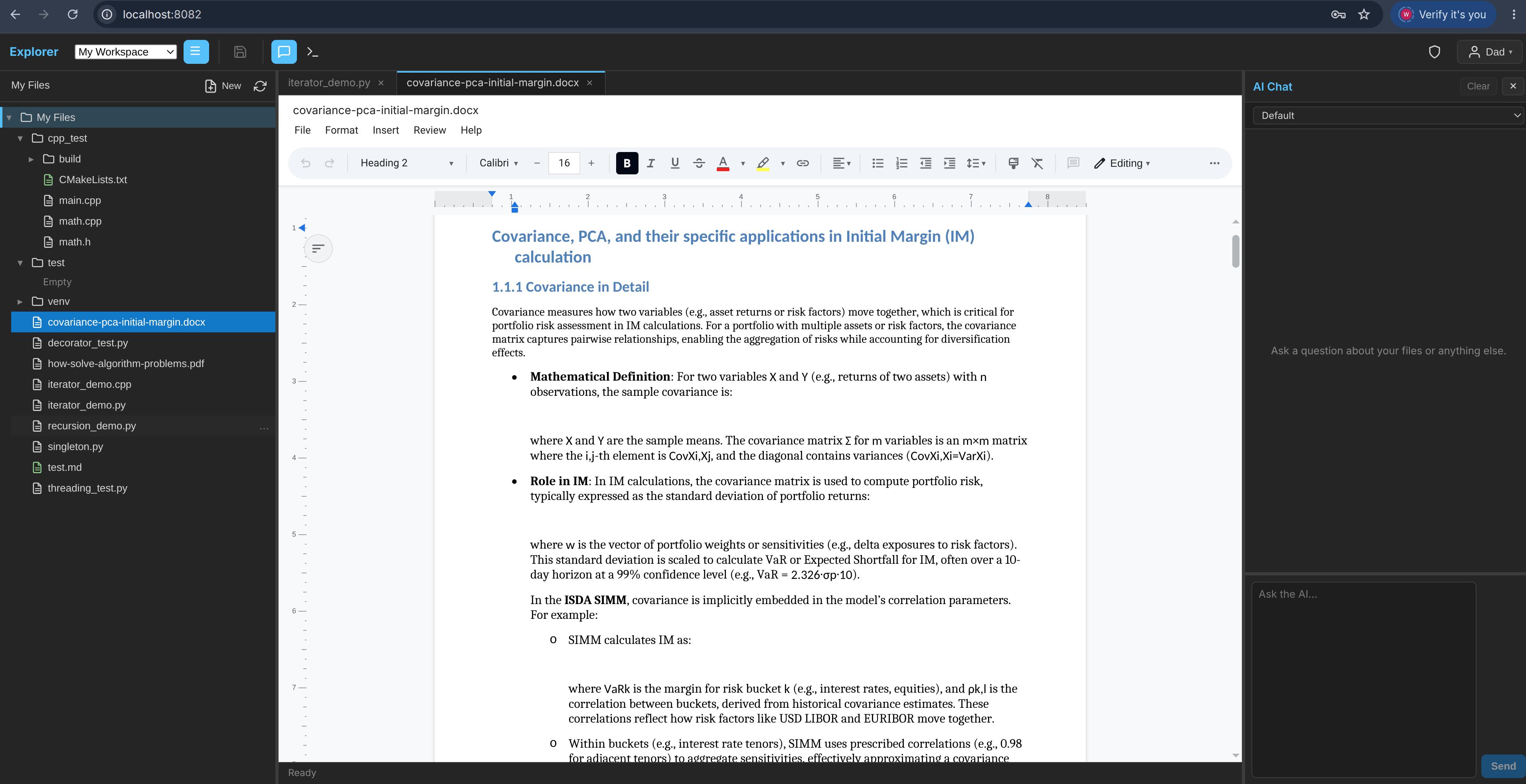
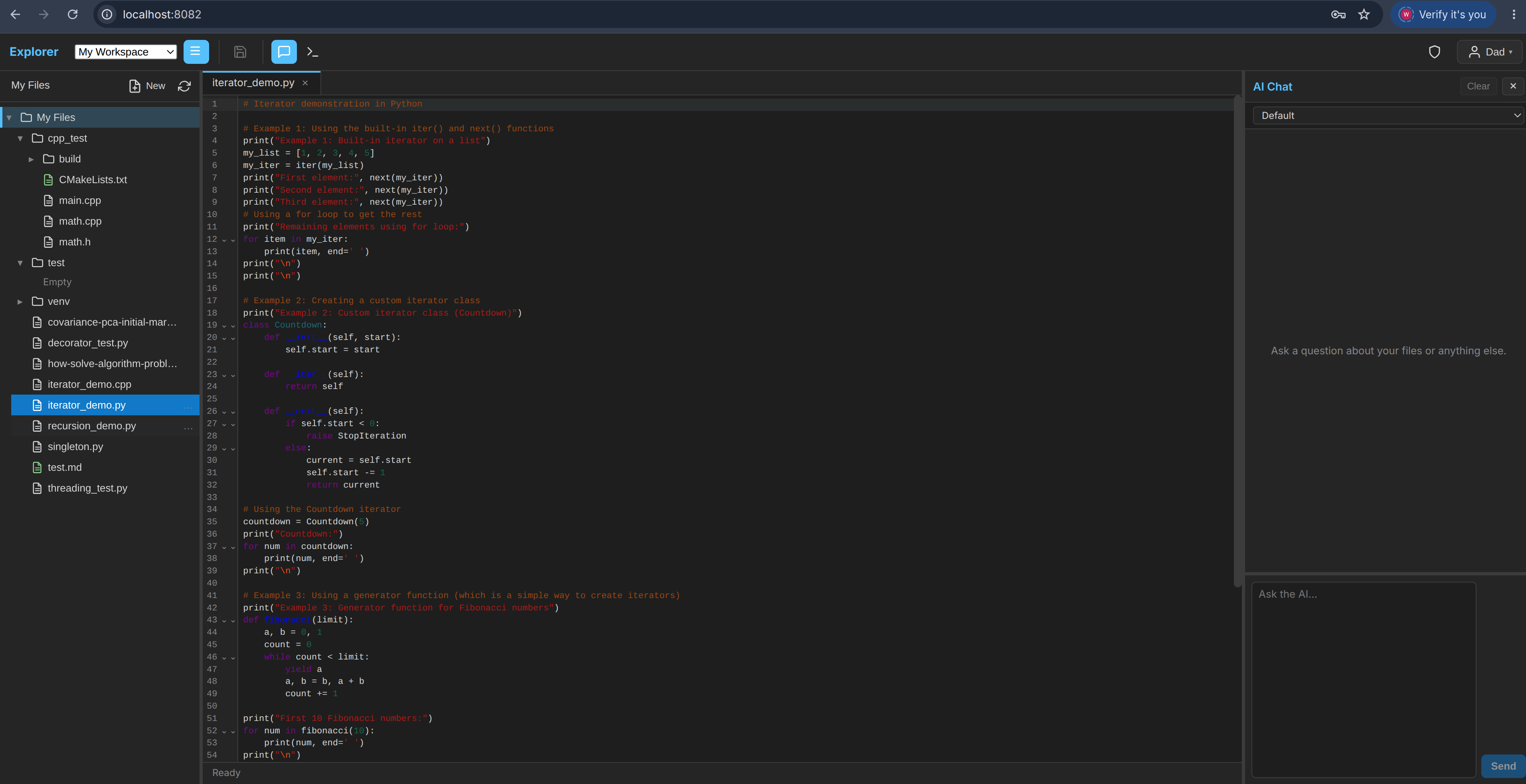
Hearth presents a clean, browser-based interface that adapts to different users:
Basic Web UI — designed for non-technical users
Everyday workspace with built-in AI chat. Users can write documents, manage files, ask questions in natural language, and perform simple programming tasks without leaving a single, intuitive screen.
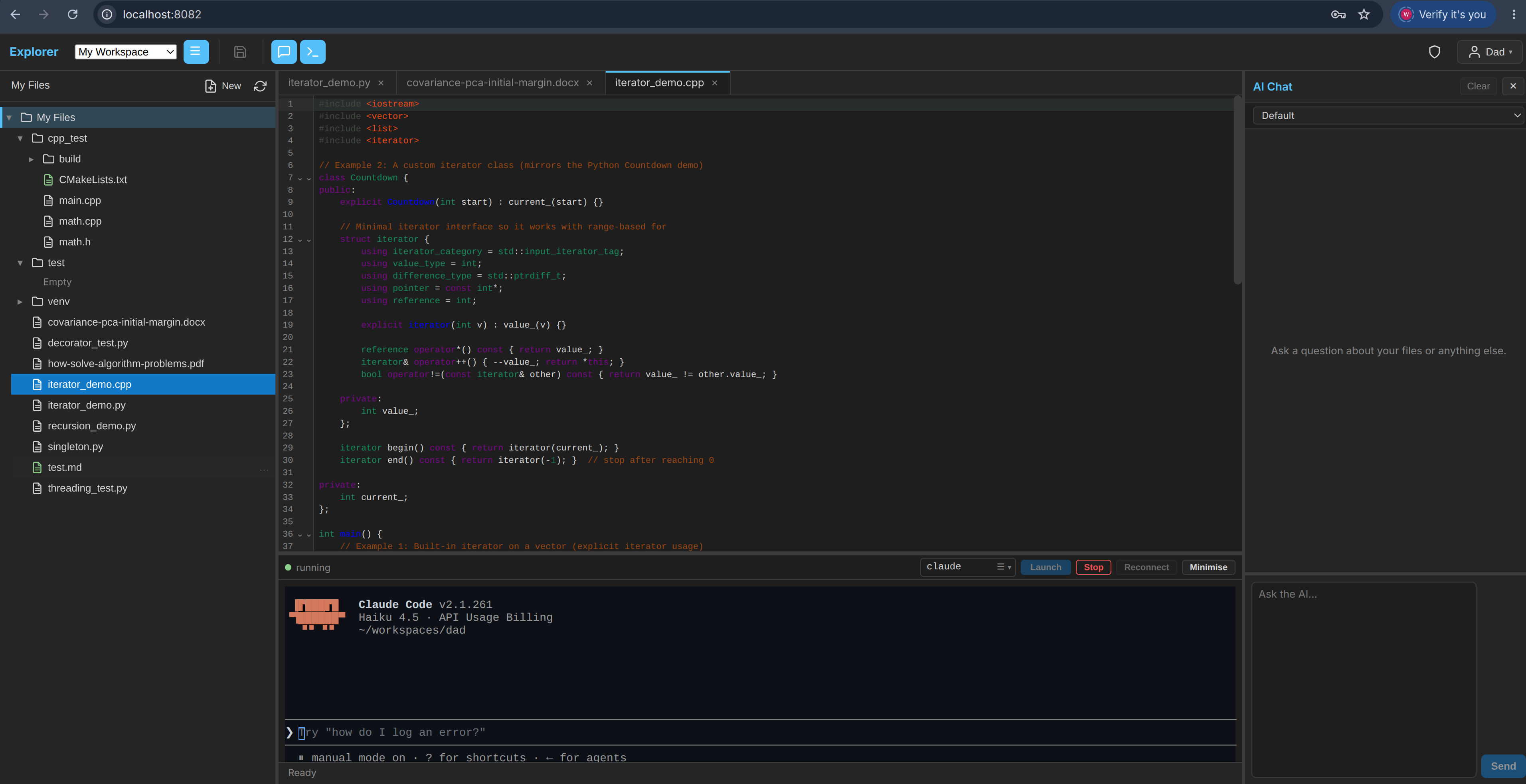
Advanced Web UI — for users who need deeper coding support
Embeds powerful AI coding agents (such as Claude Code, Codex, and similar tools) directly in the workspace, so advanced users can write, debug, and iterate on code with AI assistance in the same environment.
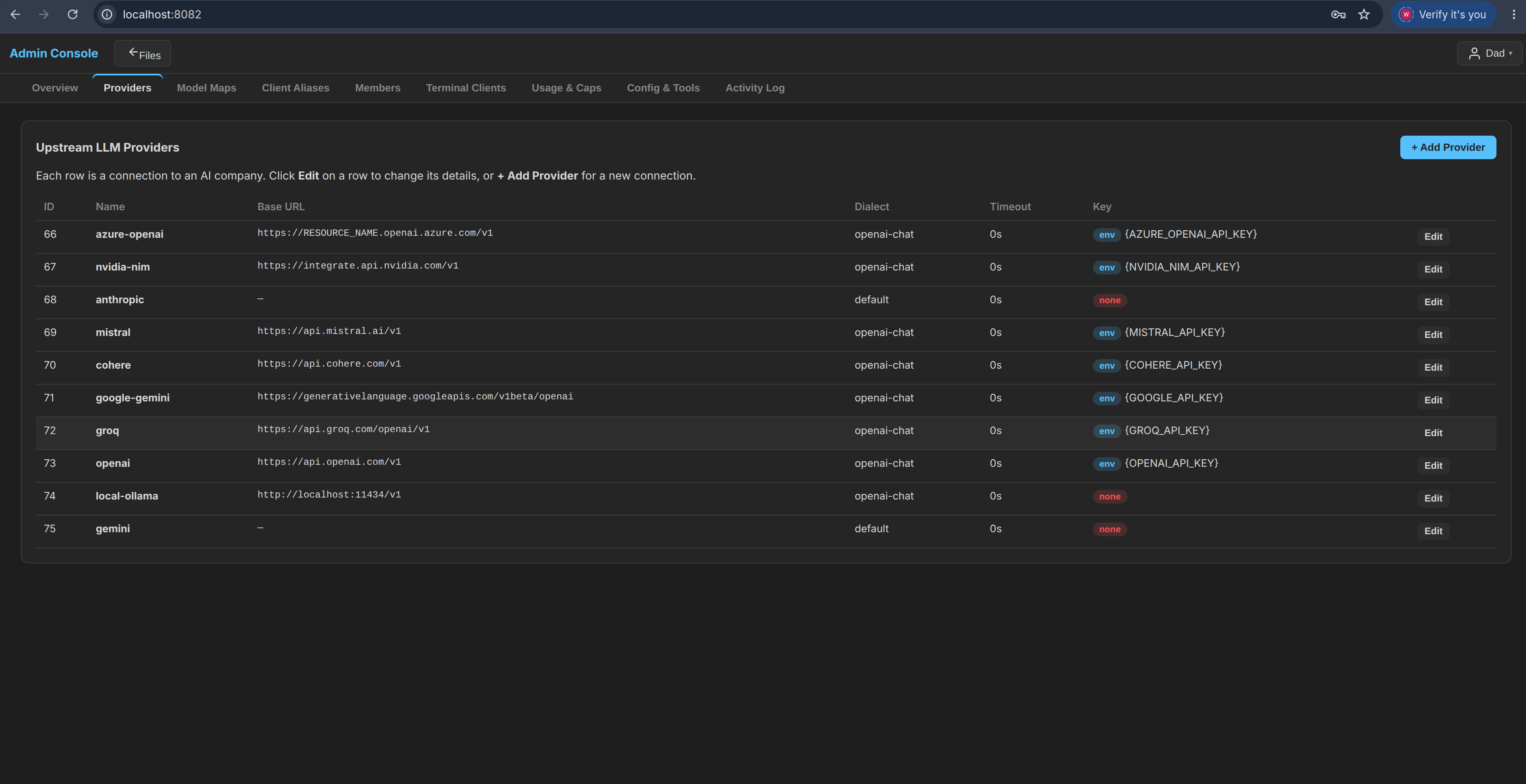
Admin Web UI — for administrators and site managers
Centralized control panel for managing users, settings, deployments, AI backends, and system health.
Flexible Deployment for Real-World Constraints
Different users have different preferences and constraints. Hearth supports multiple deployment styles:
| Deployment Style | Who It Serves | Key Advantages |
|---|---|---|
| Local (Mini PC / Raspberry Pi) | Households, schools, libraries that want privacy and offline resilience | Full data ownership, works during internet outages, very low ongoing cost |
| Self-hosted on a VPS | Users who want access from multiple devices without managing hardware | Simple remote access, still under the user’s control |
| Hybrid with cloud storage | People who already keep files in Google Drive, Dropbox, OneDrive, etc. | Familiar file locations + powerful local AI tools |
This flexibility means a family can keep sensitive documents on a living-room Mini PC, a school computer lab can run a shared instance, and a librarian can offer AI-assisted services without sending patron data to third-party clouds. Because files remain in the user’s own storage (local or familiar cloud drives), switching AI backends or providers later does not require re-uploading or rebuilding an entire body of work.
Primary Audiences and Everyday Use Cases
Households and families
Write formal letters, update résumés, create presentations for community meetings, help children with homework, or explore coding projects together — all from one consistent environment.
Schools and educators
Provide students and teachers with a controlled, privacy-respecting AI workspace for writing, research support, lesson planning, and introductory programming. Suitable for classroom computers or a single shared server.
Public libraries and community centers
Offer patrons AI-assisted document help, digital literacy tools, and coding resources without requiring expensive commercial licenses or continuous cloud connectivity.
Homeschooling families and after-school programs
Give learners a rich set of writing and coding tools that remain available even when internet access is limited or intermittent.
Freelancers, solopreneurs, and small nonprofits
Produce professional documents and manage light coding or automation tasks without monthly SaaS fees for every specialized tool.
Makerspaces, coding clubs, and digital literacy programs
Run a shared, reliable AI environment on modest hardware that participants can use immediately.
Technical Foundations That Make Everyday Use Practical
Although Hearth is designed for non-enterprise users, it inherits a high-performance core originally engineered for demanding environments:
- Native C++ architecture that runs efficiently on modest hardware (including Raspberry Pi-class devices)
- Built-in resilience so that temporary provider issues do not stop local work
- Support for multiple AI backends, giving users freedom to choose or switch models without losing their files or workspace
- Integrated web workspace with file management and terminal access when needed
- Straightforward integration with popular cloud storage services including Google Drive, Dropbox, and OneDrive
These capabilities remain largely invisible to the end user. The goal is that a parent, teacher, or librarian can open Hearth and simply start working — without learning a new ecosystem or surrendering ownership of their documents.
A Realistic Path Forward
Hearth does not attempt to outspend large enterprise AI vendors. Instead it focuses on the large population of users who need practical AI assistance for everyday writing, learning, and light coding — and who value privacy, local control, data portability, and low cost.
By shipping as a ready-to-use workspace rather than a raw developer tool, supporting truly local deployment on accessible hardware, keeping files under the user’s control, and integrating cleanly with the cloud storage people already trust (Google Drive, Dropbox, OneDrive, and similar services), Hearth aims to become the default AI productivity environment for homes, schools, libraries, and community organizations.
Enterprise teams that value the same combination of performance, self-hosting, and workspace features remain free to adopt it. The primary design priority, however, is making powerful AI assistance genuinely usable by ordinary people in ordinary settings — without the breadth-without-focus, unintuitive workflow, and file lock-in that characterize most current web-based LLM services.
Getting Started
Hearth is self-hosted software you run on hardware or VPS you already have. If you’d like a hand picking the hardware, setting it up, or configuring it for your household, that’s exactly what our services are for.